Cloud Chronicles
Practical articles on AWS architecture, migration, security, and AI tooling — written from the trenches of migrating Go3 OTT to AWS.
Running Claude Code Locally: AWS Bedrock Setup for VS Code
 Generated with DaVinci.ai
In previous articles in this series, we’ve covered setting up IAM Identity Center for multi-account access and configuring VS Code for AWS CLI and Python tasks. Now, we’ll take it a step further by integrating Claude, Anthropic’s powerful AI assistant, directly into VS Code using AWS Bedrock.
Claude Code is Anthropic’s official IDE integration that brings Claude’s capabilities directly into your development environment. Unlike traditional chatbots, Claude Code can read your codebase, make edits, run commands, and help you build software more efficiently. By connecting it to AWS Bedrock instead of using direct API keys, you get the benefits of enterprise-grade security, centralized billing, and seamless integration with your existing AWS infrastructure.
What is AWS Bedrock?
AWS Bedrock is Amazon’s fully managed service for accessing foundation models from leading AI companies, including Anthropic’s Claude models. It provides a unified API to work with multiple AI models while maintaining your data within your AWS environment.
Benefits of using Bedrock for Claude Code:
Security: All authentication flows through your existing AWS SSO and IAM policies - no API keys stored in VS Code or on your machine.
Cost Management: Usage appears in your AWS billing dashboard alongside other services, making it easier to track and allocate costs.
Compliance: Data stays within your AWS environment and region, helping meet regulatory requirements.
Enterprise Integration: Leverage existing AWS infrastructure, policies, and access controls your organization already has in place.
Architecture Overview
Here’s how Claude Code integrates with AWS Bedrock:
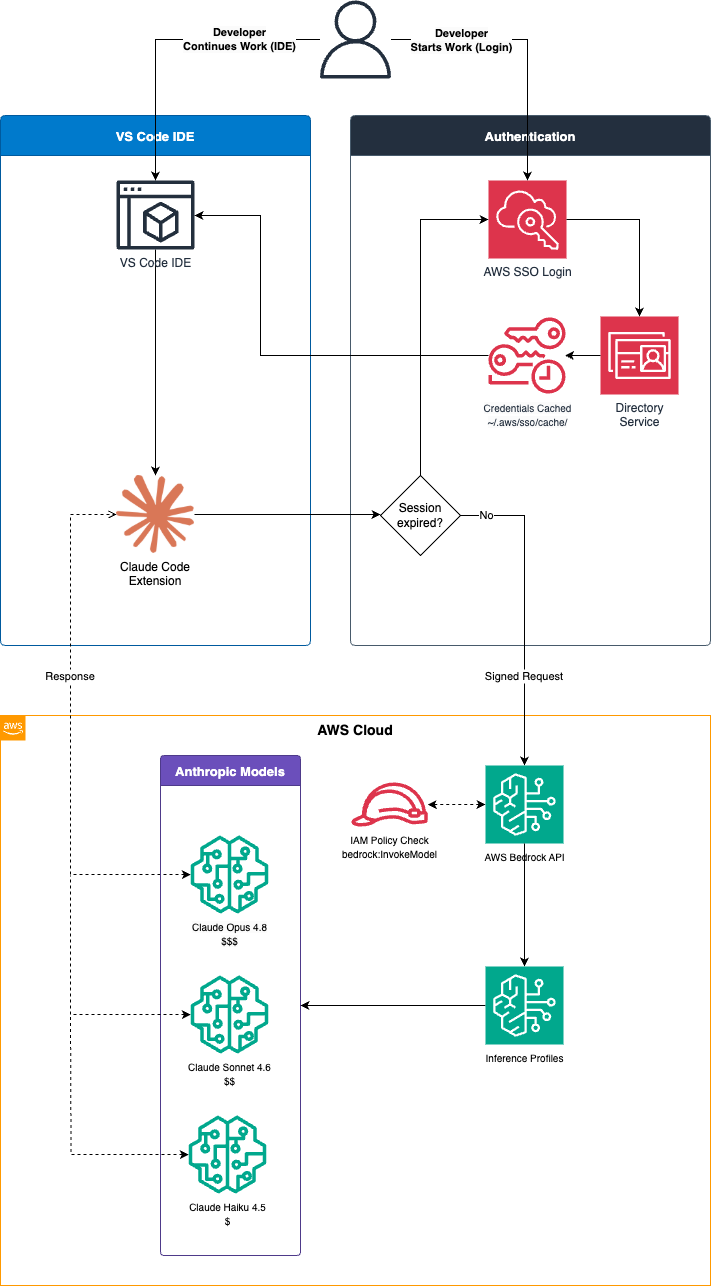
The authentication and request flow works as follows:
- You authenticate to AWS SSO using your organization’s identity provider (e.g., Entra ID, Okta)
- AWS CLI stores temporary credentials in
~/.aws/sso/cache/ - VS Code reads these credentials via environment variables (
AWS_PROFILE,AWS_REGION) - Claude Code extension uses the AWS SDK to call Bedrock APIs
- Bedrock routes your requests to the appropriate Claude model
- Responses flow back through the same chain
No API keys required - everything authenticates through your existing AWS SSO session.
Prerequisites
Before starting this guide, you should have already completed:
✅ AWS CLI installed - Covered in Using VS Code for CLI tasks - Part 2
✅ IAM Identity Center configured - Covered in Easier access to multiple accounts with IAM Identity Center
✅ VS Code installed - Covered in Using VS Code for CLI tasks - Part 1
Additionally, you’ll need:
✅ Claude Code extension - Install from VS Code marketplace: anthropic.claude-code
✅ Bedrock access - Access to AWS Bedrock in your AWS account (we’ll cover this next)
Step 1: Enable AWS Bedrock Access
1.1 Verify Bedrock Availability
Bedrock is available in specific AWS regions. For this guide, we’ll use eu-north-1 (Stockholm), but you can check availability in other regions:
# List available regions for Bedrock
aws ec2 describe-regions --query "Regions[].RegionName" --output table
Common Bedrock regions include:
us-east-1(N. Virginia)us-west-2(Oregon)eu-west-1(Ireland)eu-north-1(Stockholm)ap-southeast-1(Singapore)
1.2 Verify Model Access
Claude models in Bedrock are available by default - you don’t need to request access. However, it’s good practice to verify that the models are accessible in your account:
- Sign in to AWS Management Console
- Navigate to Bedrock service
- In the left menu, click Model access
- Verify that Claude models show “Available” status:
- Claude Opus 4.8 (most capable)
- Claude Sonnet 4.6 (balanced, recommended)
- Claude Haiku 4.5 (fast, economical)
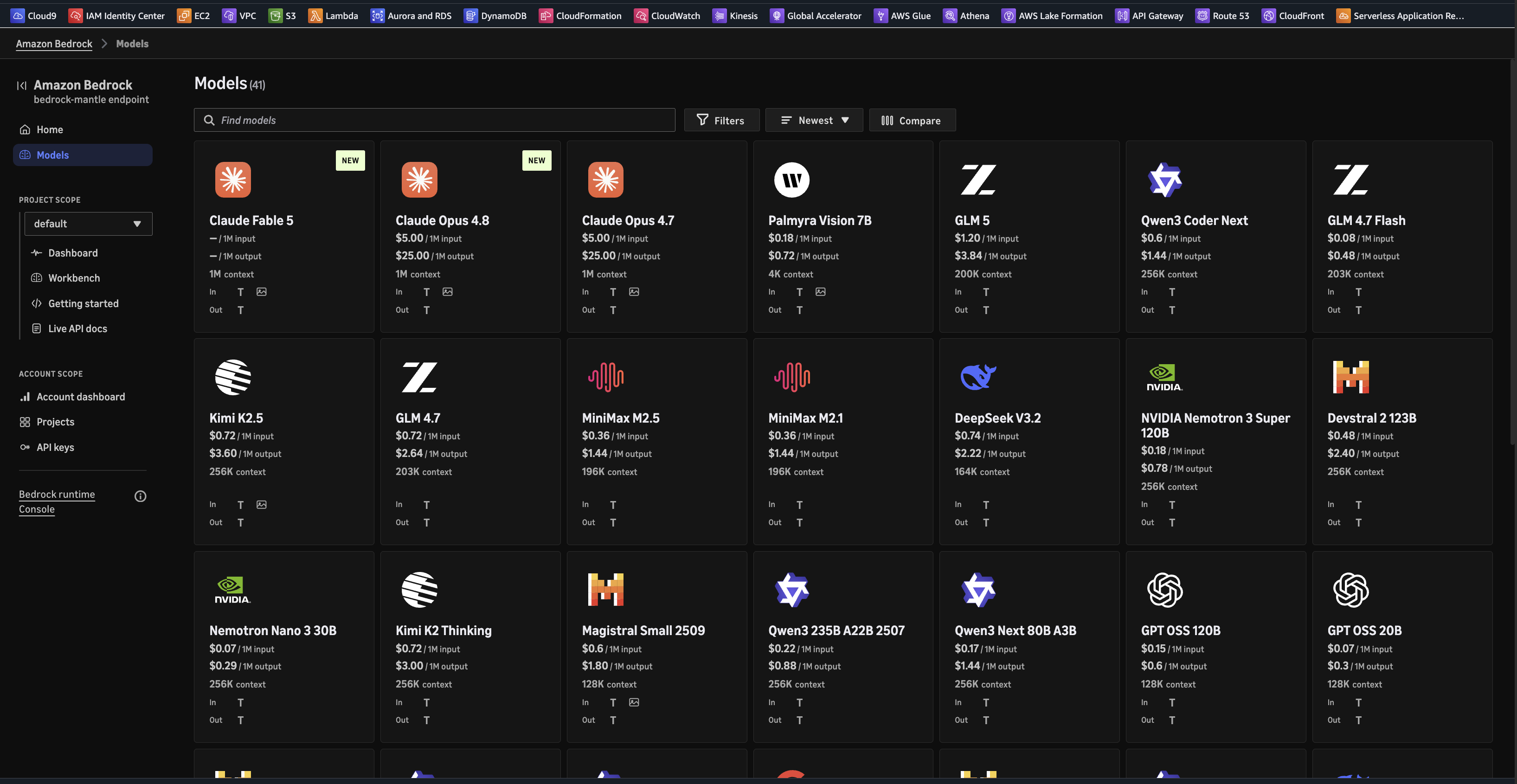
Note: While Claude models are available by default, some other foundation models in Bedrock may require you to request access. If you plan to use models from other providers, you may need to click Modify model access and request access to those specific models.
At the moment of writing this article, the highly anticipated Claude Fable 5 model is already available, however it requires data to be shared directly with Anthropic (see below). The highest usable model through Bedrock is currently Claude Opus 4.8, which provides excellent performance for most tasks while keeping data within your AWS environment.
UPDATE: As of 12 June 2026, Anthropic Claude Fable 5* has been suspended by US regulators due to concerns about data privacy and compliance, see Statement on the US government directive to suspend access to Fable 5 and Mythos 5 for up to date information. The suspension was lifted by the end of June, however, usage is being monitored to comply with export standards.
1.3 Configure IAM Permissions
Your IAM user or role needs permissions to invoke Bedrock models. If you’re using IAM Identity Center (as covered in our previous article), you’ll need to update your permission set.
Option A: Create a Custom Permission Set (Recommended)
- Open IAM Identity Center in AWS Management Console
- Click Permission sets in the left menu
- Click Create permission set
- Select Custom permission set
- Click Create a custom permissions policy
- Add the following policy:
{
  "Version": "2012-10-17",
  "Statement": [
    {
      "Effect": "Allow",
      "Action": [
        "bedrock:InvokeModel",
        "bedrock:InvokeModelWithResponseStream",
        "bedrock:ListFoundationModels",
        "bedrock:GetFoundationModel",
        "bedrock:ListInferenceProfiles",
        "bedrock:GetInferenceProfile"
      ],
      "Resource": "*"
    }
  ]
}
- Name the permission set:
BedrockUserAccess - Set session duration (e.g., 12 hours)
- Click Create
Option B: Add Inline Policy to Existing Permission Set
If you already have a PowerUserAccess or custom permission set:
- Go to IAM Identity Center → Permission sets
- Select your existing permission set
- Click Edit → Inline policy
- Add the Bedrock permissions shown above
- Save the changes
1.4 Assign Permission Set to User
Once the permission set is created:
- In IAM Identity Center, click AWS accounts
- Select the account(s) you want to grant access to
- Click Assign users or groups
- Select your user
- Click Next
- Select the
BedrockUserAccesspermission set - Click Next → Submit
Important: If you added permissions to an existing permission set, users will automatically get access. If you created a new permission set, you need to assign it as shown above.
Step 2: Configure AWS CLI Profile
If you followed our IAM Identity Center article, you should already have AWS CLI configured with SSO. Let’s create or verify a profile with Bedrock access.
2.1 Configure SSO Profile
Run the AWS SSO configuration wizard:
aws configure sso
You’ll be prompted for:
SSO session name (Recommended): my-sso
SSO start URL [None]: https://your-company.awsapps.com/start
SSO region [None]: eu-central-1
SSO registration scopes [None]: sso:account:access
Your browser will open for authentication. Log in with your organizational credentials (e.g., Entra ID).
After authentication, select:
Account: Your Account Name (123456789012)
Role: BedrockUserAccess
CLI default client Region [None]: eu-north-1
CLI default output format [None]: json
CLI profile name [BedrockUserAccess-123456789012]: bedrock-access-profile
This creates a profile named bedrock-access-profile in ~/.aws/config:
[profile bedrock-access-profile]
sso_session = my-sso
sso_account_id = 123456789012
sso_role_name = BedrockUserAccess
region = eu-north-1
output = json

[sso-session my-sso]
sso_start_url = https://your-company.awsapps.com/start
sso_region = eu-central-1
sso_registration_scopes = sso:account:access
2.2 Test Bedrock Access
Login to AWS SSO:
aws sso login --profile bedrock-access-profile
Your browser will open again for authentication. After successful login, test Bedrock access:
# List available Claude models
aws bedrock list-foundation-models \
  --profile bedrock-access-profile \
  --region eu-north-1 \
  --query 'modelSummaries[?contains(modelId, `anthropic.claude`)].[modelId,modelName]' \
  --output table
Expected output:
--------------------------------------------------------------------
|                       ListFoundationModels                       |
+--------------------------------------------+---------------------+
|  anthropic.claude-sonnet-4-20250514-v1:0   |  Claude Sonnet 4    |
|  anthropic.claude-opus-4-8                 |  Claude Opus 4.8    |
|  anthropic.claude-opus-4-7                 |  Claude Opus 4.7    |
|  anthropic.claude-haiku-4-5-20251001-v1:0  |  Claude Haiku 4.5   |
|  anthropic.claude-sonnet-4-5-20250929-v1:0 |  Claude Sonnet 4.5  |
|  anthropic.claude-fable-5                  |  Claude Fable 5     |
|  anthropic.claude-sonnet-4-6               |  Claude Sonnet 4.6  |
|  anthropic.claude-opus-4-5-20251101-v1:0   |  Claude Opus 4.5    |
|  anthropic.claude-opus-4-6-v1              |  Claude Opus 4.6    |
+--------------------------------------------+---------------------+
Step 3: Understanding Inference Profiles
AWS Bedrock uses inference profiles to route requests to models. This is important because the model IDs you see in the list above are not what you’ll use in VS Code.
What are Inference Profiles?
Inference profiles are region-specific endpoints that provide:
- Lower latency: Requests route to the nearest available model endpoint
- Higher availability: Automatic failover between availability zones
- Simplified configuration: Single ID works across model versions
Inference Profile IDs vs Model IDs
For eu-north-1 (Stockholm), you must use inference profile IDs with the eu. prefix:
| Model Name | ❌ Model ID (won’t work) | ✅ Inference Profile ID (use this) |
|---|---|---|
| Claude Opus 4.8 | anthropic.claude-opus-4-8 |
eu.anthropic.claude-opus-4-8 |
| Claude Sonnet 4.6 | anthropic.claude-sonnet-4-6 |
eu.anthropic.claude-sonnet-4-6 |
| Claude Haiku 4.5 | anthropic.claude-haiku-4-5-20251001-v1:0 |
eu.anthropic.claude-haiku-4-5-20251001-v1:0 |
You can list available inference profiles:
aws bedrock list-inference-profiles \
  --profile bedrock-access-profile \
  --region eu-north-1 \
  --query 'inferenceProfileSummaries[?contains(inferenceProfileId, `anthropic`)].[inferenceProfileId,inferenceProfileName]' \
  --output table
Key point: Always use the inference profile ID (with region prefix) in your VS Code configuration.
Step 4: Configure VS Code for Claude Code
Now that Bedrock access is working, let’s configure VS Code to use it.
4.1 Install Claude Code Extension
If not already installed:
- Open VS Code
- Press
⌘+Shift+X(Mac) orCtrl+Shift+X(Windows/Linux) - Search for “Claude Code”
- Look for publisher:
Anthropic - Click Install
4.2 Configure User Settings
Open VS Code settings:
- Press
⌘+,(Mac) orCtrl+,(Windows/Linux) - Click the
{}icon in the top-right to opensettings.json - Add the following configuration:
{
  "claude.apiProvider": "bedrock",
  "claude.awsRegion": "eu-north-1",
  "claude.model": "eu.anthropic.claude-sonnet-4-6",
  "terminal.integrated.env.osx": {
    "AWS_PROFILE": "bedrock-access-profile",
    "AWS_REGION": "eu-north-1"
  },
  "terminal.integrated.inheritEnv": true
}
For Windows users, replace terminal.integrated.env.osx with:
"terminal.integrated.env.windows": {
  "AWS_PROFILE": "bedrock-access-profile",
  "AWS_REGION": "eu-north-1"
}
For Linux users, use:
"terminal.integrated.env.linux": {
  "AWS_PROFILE": "bedrock-access-profile",
  "AWS_REGION": "eu-north-1"
}
Save the file (⌘+S or Ctrl+S).
4.3 Project-Specific Configuration (Optional)
For project-specific settings, create .vscode/settings.json in your project root:
{
  "claude.model": "eu.anthropic.claude-opus-4-8",
  "terminal.integrated.env.osx": {
    "AWS_PROFILE": "bedrock-access-profile",
    "AWS_REGION": "eu-north-1"
  }
}
This allows you to use different models for different projects (e.g., Opus for complex projects, Sonnet for general work).
4.4 Reload VS Code
After configuration, reload the VS Code window:
- Press
⌘+Shift+P(Mac) orCtrl+Shift+P(Windows/Linux) - Type:
Developer: Reload Window - Press Enter
Alternatively, press ⌘+R (Mac) or Ctrl+R (Windows/Linux).
Step 5: Verify Installation
Let’s verify everything is working correctly.
5.1 Run the Test Script
Download and run the test script (included in this article’s repository):
# Navigate to the article directory
cd "path/to/cloud-chronicles/10. AWS Bedrock, Claude Code and VSCode"

# Make script executable
chmod +x test-bedrock-connection.sh

# Run test
./test-bedrock-connection.sh
Expected output:
🔍 Testing AWS Bedrock Connection for Claude Code
==================================================

✅ AWS CLI installed
ℹ️  Using AWS_PROFILE: bedrock-access-profile
ℹ️  Using AWS_REGION: eu-north-1

🔐 Checking AWS Authentication...
✅ Authenticated as:
----------------------------------------------------
|            GetCallerIdentity                     |
+--------------------------------------------------+
| UserId     | AROA...@yourcompany.com             |
| Account    | 123456789012                         |
| Arn        | arn:aws:sts::123456789012:assumed... |
----------------------------------------------------

🤖 Checking Available Claude Models...
✅ Available Claude models in eu-north-1:
[List of models displayed in table]

🧪 Testing Bedrock API Call...
✅ Can access inference profile: eu.anthropic.claude-sonnet-4-6

==================================================
✅ All tests passed! Claude Code should work in VS Code.
If any test fails, refer to the Troubleshooting section below.
5.2 Open Claude Code Panel
In VS Code:
- Look for the Claude icon in the left sidebar
- Click it to open the Claude Code panel
- Or press
⌘+Shift+Pand type:Claude: Focus
5.3 Send Test Message
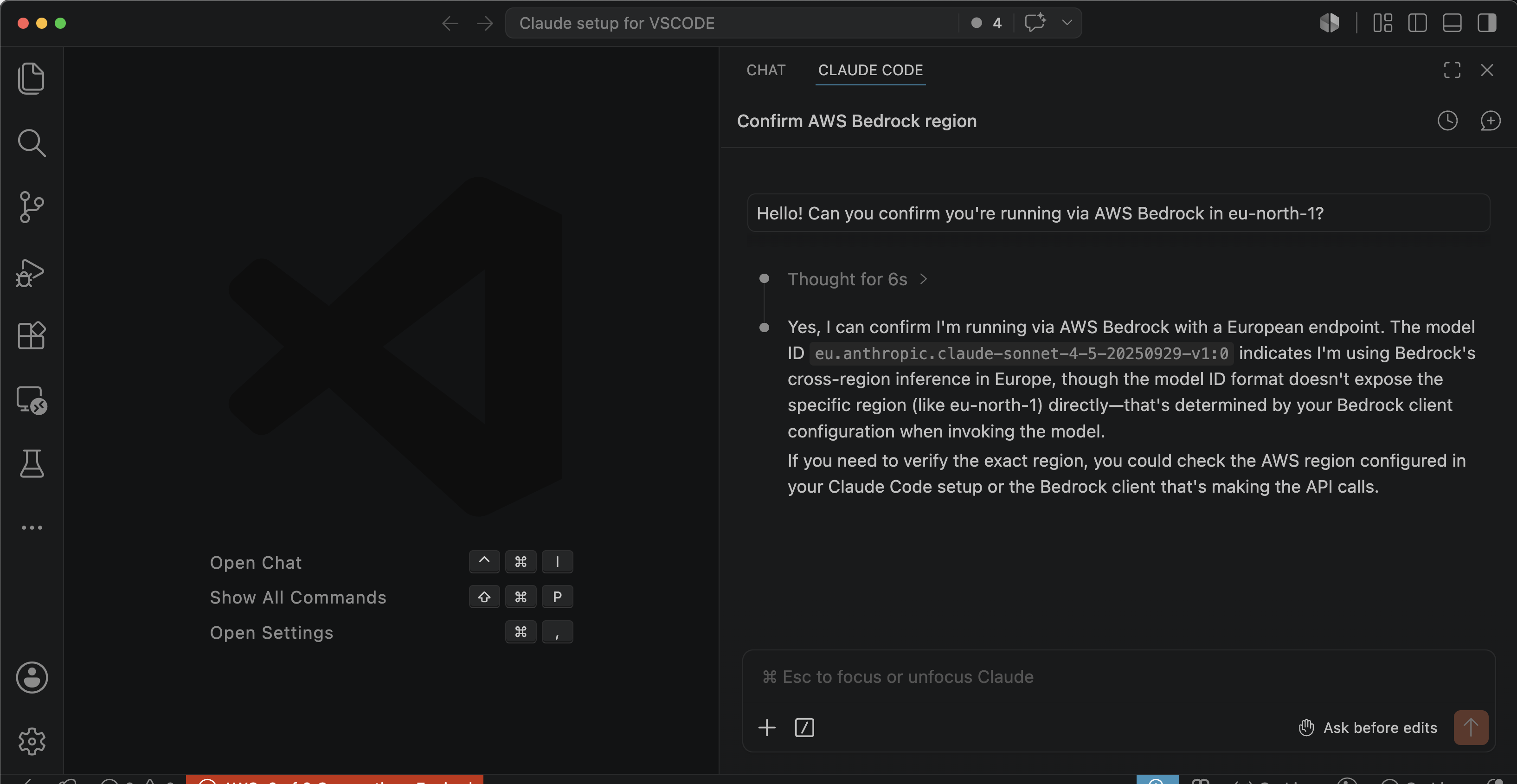
In the Claude Code chat interface, type:
Hello! Can you confirm you're running via AWS Bedrock in eu-north-1?
If everything is configured correctly, Claude will respond, confirming the connection.
Step 6: Daily Workflow
Once configured, your daily workflow is simple:
Morning Setup
# 1. Login to AWS SSO (once per day)
aws sso login --profile bedrock-access-profile

# 2. Open VS Code
code

# 3. Start using Claude Code!
When Session Expires
AWS SSO sessions typically last 8-12 hours. When expired:
# 1. Re-authenticate
aws sso login --profile bedrock-access-profile

# 2. In VS Code: Reload window
# Press ⌘+R (Mac) or Ctrl+R (Windows/Linux)
Verify Session Status
# Check if authenticated
aws sts get-caller-identity --profile bedrock-access-profile

# If successful, you'll see your user details
# If expired, you'll get an error
Model Selection Guide
Choose the right Claude model for your task:
Claude Sonnet 4.6 (Recommended Default)
Inference Profile ID: eu.anthropic.claude-sonnet-4-6
Best for: Daily development tasks, code reviews, refactoring, general questions
Characteristics:
- Balanced performance and cost
- Fast response times
- Excellent for most coding tasks
- Good context understanding
Use when: You need reliable, quick assistance for standard development work
Claude Opus 4.8 (Most Capable)
Inference Profile ID: eu.anthropic.claude-opus-4-8
Best for: Complex architecture decisions, system design, challenging debugging
Characteristics:
- Highest capability
- Deeper reasoning
- Better at complex multi-step tasks
- Higher cost per request
Use when: Working on complex problems that require deep analysis or novel solutions
Claude Haiku 4.5 (Fast & Economical)
Inference Profile ID: eu.anthropic.claude-haiku-4-5-20251001-v1:0
Best for: Quick questions, simple code generation, documentation
Characteristics:
- Fastest responses
- Most economical
- Good for straightforward tasks
- Lower context window
Use when: You need quick answers or are generating simple code snippets
About Fable 5
Note: While Anthropic has released Claude Fable 5 as their latest model, we do not recommend using it with Bedrock for this setup. Fable 5 requires data to be shared directly with Anthropic rather than keeping it within your AWS environment, which defeats one of the primary benefits of using Bedrock:
- ❌ Data leaves AWS: Requests route to Anthropic’s infrastructure, not AWS Bedrock
- ❌ Different compliance posture: Data governance and residency guarantees change
- ❌ Separate billing: Costs appear on Anthropic’s billing, not AWS consolidated billing
Why use Bedrock instead: When using Claude Opus 4.8, Sonnet 4.6, or Haiku 4.5 through Bedrock:
- ✅ All data stays within your AWS environment and region
- ✅ Authentication through AWS SSO (no separate API keys)
- ✅ Costs tracked in AWS Cost Explorer alongside other services
- ✅ Enterprise compliance and audit requirements met
For most enterprise and production use cases, Claude Opus 4.8 via Bedrock provides excellent capability while maintaining data within your AWS infrastructure.
Troubleshooting
❌ “Authentication Error” or “Access Denied”
Symptoms: Claude Code shows authentication errors
Solutions:
- Check AWS session status:
aws sts get-caller-identity --profile bedrock-access-profile - If expired, re-login:
aws sso login --profile bedrock-access-profile - Verify environment variables in VS Code terminal:
echo $AWS_PROFILE echo $AWS_REGION - Reload VS Code window (
⌘+R)
❌ “Model Not Found” or “Invalid Model ID”
Symptoms: Error about model not being available
Solutions:
- Verify you’re using inference profile ID (with
eu.prefix):- ✅ Correct:
eu.anthropic.claude-sonnet-4-6 - ❌ Wrong:
anthropic.claude-sonnet-4-6
- ✅ Correct:
- Check model availability in your region:
aws bedrock list-inference-profiles \ --profile bedrock-access-profile \ --region eu-north-1 -
Update
settings.jsonwith correct inference profile ID - Reload VS Code window
❌ Environment Variables Not Set in VS Code
Symptoms: Terminal shows empty $AWS_PROFILE
Solutions:
- Verify settings in
settings.json:- Check you’re using the correct platform key (
osx,windows, orlinux) - Ensure
terminal.integrated.inheritEnvistrue
- Check you’re using the correct platform key (
-
Close all terminal windows in VS Code
- Fully restart VS Code (not just reload):
# Quit VS Code # Reopen VS Code - Open a new terminal and verify:
echo $AWS_PROFILE
echo $AWS_REGION
❌ Bedrock Access Denied
Symptoms: AWS CLI works, but Bedrock calls fail
Solutions:
- Verify Bedrock model access was granted:
- AWS Console → Bedrock → Model access
- Check for green “Access granted” status
- Verify IAM permissions:
# Test Bedrock access directly aws bedrock list-foundation-models \ --profile bedrock-access-profile \ --region eu-north-1 - Check permission set includes Bedrock actions:
bedrock:InvokeModelbedrock:ListFoundationModelsbedrock:ListInferenceProfiles
- Contact AWS administrator if permissions are missing
❌ “Region Not Supported”
Symptoms: Error about Bedrock not available in region
Solutions:
- Verify Bedrock availability:
aws bedrock list-foundation-models --region eu-north-1 - Switch to a supported region:
- Update
claude.awsRegionin settings.json - Update
AWS_REGIONenvironment variable - Common regions:
us-east-1,us-west-2,eu-west-1,eu-north-1
- Update
- Check region-specific model availability (not all models in all regions)
Advanced Configuration
Multiple Profiles for Different Projects
Create project-specific configurations in .vscode/settings.json:
Production project (using production AWS account):
{
  "claude.model": "eu.anthropic.claude-opus-4-8",
  "terminal.integrated.env.osx": {
    "AWS_PROFILE": "production-bedrock",
    "AWS_REGION": "eu-west-1"
  }
}
Development project (using dev account, cheaper model):
{
  "claude.model": "eu.anthropic.claude-haiku-4-5-20251001-v1:0",
  "terminal.integrated.env.osx": {
    "AWS_PROFILE": "dev-bedrock",
    "AWS_REGION": "eu-north-1"
  }
}
Custom Claude Instructions
Create a CLAUDE.md file in your project root to give Claude project-specific context:
# Project: Cloud Chronicles

This is a technical blog about AWS cloud architecture.

## Code Style
- Use clear, educational examples
- Include comments explaining "why"
- Prefer AWS CLI over SDK examples

## Conventions
- All examples use `eu-north-1` region
- Use IAM Identity Center, not access keys
- Reference previous articles when relevant
Claude Code automatically reads this file and applies the context to all conversations.
Cost Optimization
Monitor and optimize Bedrock costs:
- Use appropriate models:
- Haiku for simple tasks
- Sonnet for general work
- Opus only when necessary
- Check costs in AWS Console:
- Navigate to Cost Explorer
- Filter by service: “Amazon Bedrock”
- Group by: Model ID or Region
- Set up billing alerts:
# Example: Create CloudWatch alarm for Bedrock costs
aws cloudwatch put-metric-alarm \
  --alarm-name bedrock-cost-alert \
  --alarm-description "Alert when Bedrock costs exceed threshold" \
  --metric-name EstimatedCharges \
  --namespace AWS/Billing \
  --statistic Maximum \
  --period 86400 \
  --evaluation-periods 1 \
  --threshold 100.0 \
  --comparison-operator GreaterThanThreshold
Security Best Practices
1. No Credentials to Store
This setup requires no AWS credentials files or API keys. By using AWS SSO, you authenticate through your browser, and the AWS CLI manages temporary session tokens automatically in ~/.aws/sso/cache/. These tokens:
- Are stored locally only during active sessions
- Automatically expire after the configured session duration (typically 8-12 hours)
- Never need to be committed to version control
- Are managed entirely by AWS CLI
What you should add to .gitignore (if applicable to your project):
# Only if you're working with other AWS services that generate files
*.pem
*.key

# VS Code workspace settings (if they contain account-specific info)
.vscode/settings.local.json
Note: The ~/.aws/config file only contains profile configurations and SSO URLs - no secrets. The ~/.aws/sso/cache/ directory contains temporary tokens managed by AWS CLI.
2. Benefits of SSO-Based Authentication
This AWS SSO approach provides several security advantages over traditional API keys:
Automatic expiry: Credentials expire after the configured session duration (typically 8-12 hours)
No long-lived secrets: No API keys or access keys stored anywhere
Centralized control: Access can be revoked instantly from IAM Identity Center
Audit trail: All authentication events logged in AWS CloudTrail
3. Principle of Least Privilege
Grant only necessary Bedrock permissions:
{
  "Effect": "Allow",
  "Action": [
    "bedrock:InvokeModel",
    "bedrock:InvokeModelWithResponseStream"
  ],
  "Resource": [
    "arn:aws:bedrock:eu-north-1::foundation-model/anthropic.claude-*"
  ]
}
4. Audit Usage
Monitor Bedrock usage with CloudTrail:
# Query recent Bedrock API calls
aws cloudtrail lookup-events \
  --lookup-attributes AttributeKey=ResourceType,AttributeValue=AWS::Bedrock::Model \
  --max-results 10 \
  --profile bedrock-access-profile
5. Rotate SSO Sessions
Login fresh each day rather than relying on long-lived sessions:
# Daily routine
aws sso logout
aws sso login --profile bedrock-access-profile
Cost Considerations
Understanding Bedrock pricing helps manage costs effectively.
Pricing Model
Bedrock charges based on:
- Input tokens: Text sent to the model
- Output tokens: Text generated by the model
Prices vary by model (as of June 2026):
| Model | Input (per 1M tokens) | Output (per 1M tokens) |
|---|---|---|
| Claude Opus 4.8 | $15.00 | $75.00 |
| Claude Sonnet 4.6 | $3.00 | $15.00 |
| Claude Haiku 4.5 | $0.25 | $1.25 |
Note: Prices are examples and may vary by region and change over time. Check AWS Bedrock pricing for current rates.
Typical Usage Scenarios
Daily development (Sonnet):
- 100 requests/day
- ~1,000 input tokens/request
- ~500 output tokens/request
- Monthly cost: ~$35
Heavy usage (Opus):
- 200 requests/day
- ~2,000 input tokens/request
- ~1,000 output tokens/request
- Monthly cost: ~$570
Light usage (Haiku):
- 50 requests/day
- ~500 input tokens/request
- ~250 output tokens/request
- Monthly cost: ~$1.50
Cost Optimization Tips
- Start conversations fresh: Long conversations increase token costs
- Use targeted questions: Be specific to get concise answers
- Choose appropriate models: Don’t use Opus when Sonnet suffices
- Monitor usage: Review AWS Cost Explorer regularly
Summary
You’ve now successfully configured Claude Code to work with AWS Bedrock in VS Code! Here’s what we covered:
- ✅ Enabled Bedrock access and requested Claude model access
- ✅ Configured IAM permissions for Bedrock
- ✅ Set up AWS CLI profile with SSO authentication
- ✅ Understood inference profiles vs model IDs
- ✅ Configured VS Code with Claude Code extension
- ✅ Verified installation with test script
- ✅ Learned daily workflow and troubleshooting
Key Takeaways
- Security: No API keys stored - everything authenticates through AWS SSO
- Flexibility: Switch models per project using workspace settings
- Integration: Leverages your existing AWS infrastructure and IAM policies
- Control: Centralized billing and usage monitoring through AWS Console
Next Steps
- Explore Claude Code features: code generation, refactoring, debugging
- Customize
CLAUDE.mdfiles for project-specific context - Set up billing alerts to monitor costs
- Try different models to find the right balance for your needs
Related Articles
- Easier access to multiple accounts with IAM Identity Center
- Using VS Code for CLI and Python tasks on AWS - Part 1
- Using VS Code for CLI and Python tasks on AWS - Part 2
Happy coding with Claude!